
Activity and idle time, minute by minute
Every minute of the working day is sorted into productive, unproductive or idle time, using the app or website in use and whether there was any keyboard or mouse input. Zneus counts input; it never stores what was typed.
- 7-day free trial, no card
- No keystroke logging
- Setup help in Hindi or English
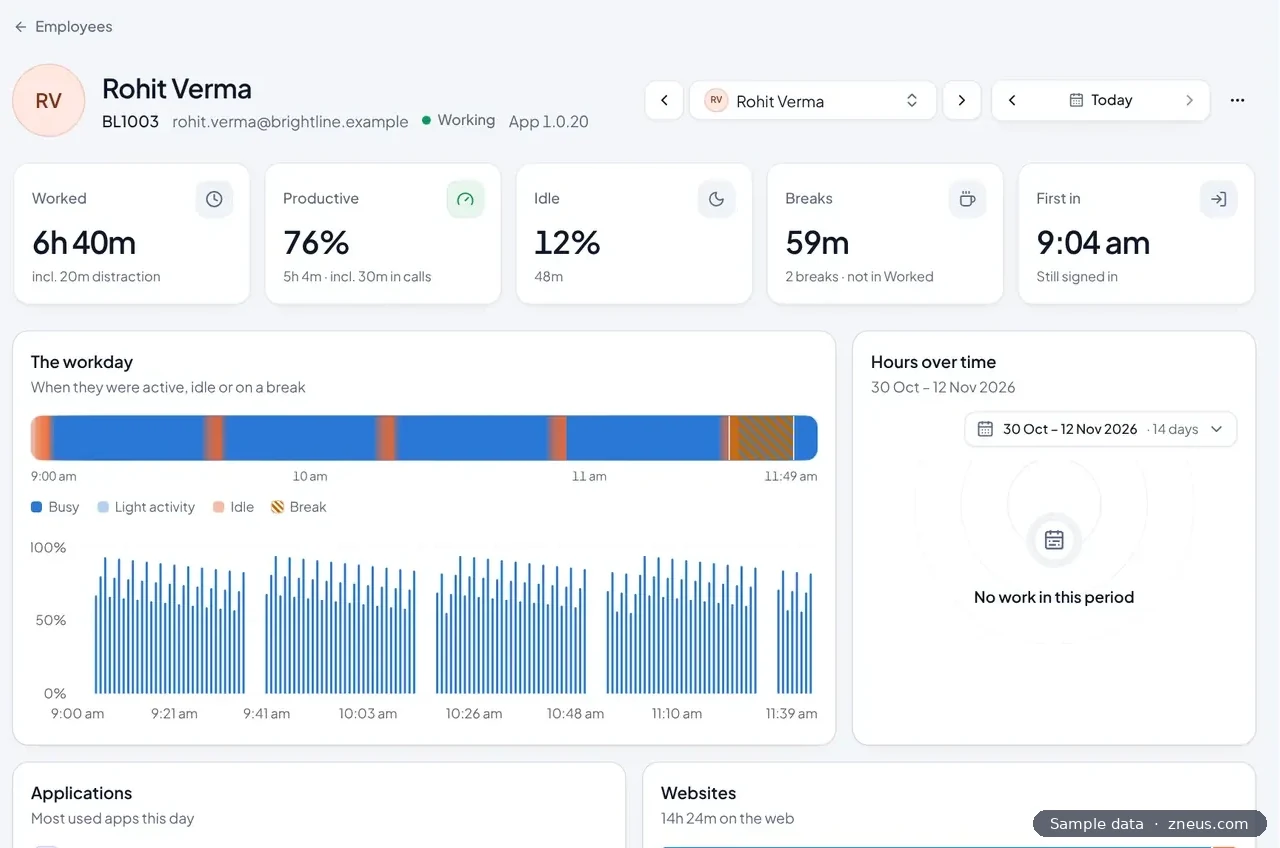
The day as a timeline
The employee page shows a timeline of the day built only from what the app recorded: working, idle, on a break, or app closed. Next to it is a keyboard and mouse graph for every minute: busy, light or no input.
Included in both plans: Starter (₹199) and Complete (from ₹299 per employee per month). See pricing.
What you see in the activity and idle time tracking screen
A real Zneus screen, filled with a made-up company's data. The numbers match the list.
1
2
3
4
- 1The day in numbers
Worked, productive, idle, breaks and first sign-in.
- 2The workday bar
Busy, light activity, idle and breaks across the day.
- 3Input per minute
How much keyboard and mouse input there was, minute by minute. Never the keys.
- 4Person and day
Move between people and dates without leaving the page.
Fake activity and mouse jigglers
If a PC stays active for 15 minutes or more with no key press or click at all, that stretch is marked for review. That is how mouse jigglers and similar tricks usually show up. A single real key or click breaks the stretch, so normal reading is not flagged.
- Alerts say "check this", not "fraud". A long video call can look the same.
- Time in calls and online meetings can be counted as working time, and is shown separately in reports.
Idle time without the guesswork
Idle time is reported by employee and by date. A long idle stretch every afternoon says something different from one slow day, and you can see which it is before you have the conversation.
Questions about activity and idle time tracking
Does Zneus record keystrokes?
No. It records whether there was keyboard or mouse input in each minute. It never stores which keys were pressed, so passwords, chats and documents are not captured.
How does Zneus decide what is idle?
A minute with no keyboard or mouse input is idle, unless the company has said that a type of away-from-keyboard work (such as calls or meetings) still counts as working time.
Can Zneus detect a mouse jiggler?
It flags 15 minutes or more of an active PC with no key press or click. That pattern is typical of jigglers, but it is a prompt to check, not proof.
Works well with
Try it on your own team for 7 days
No credit card. We help you set it up, in Hindi or English.