
Live screen monitoring for office and remote teams
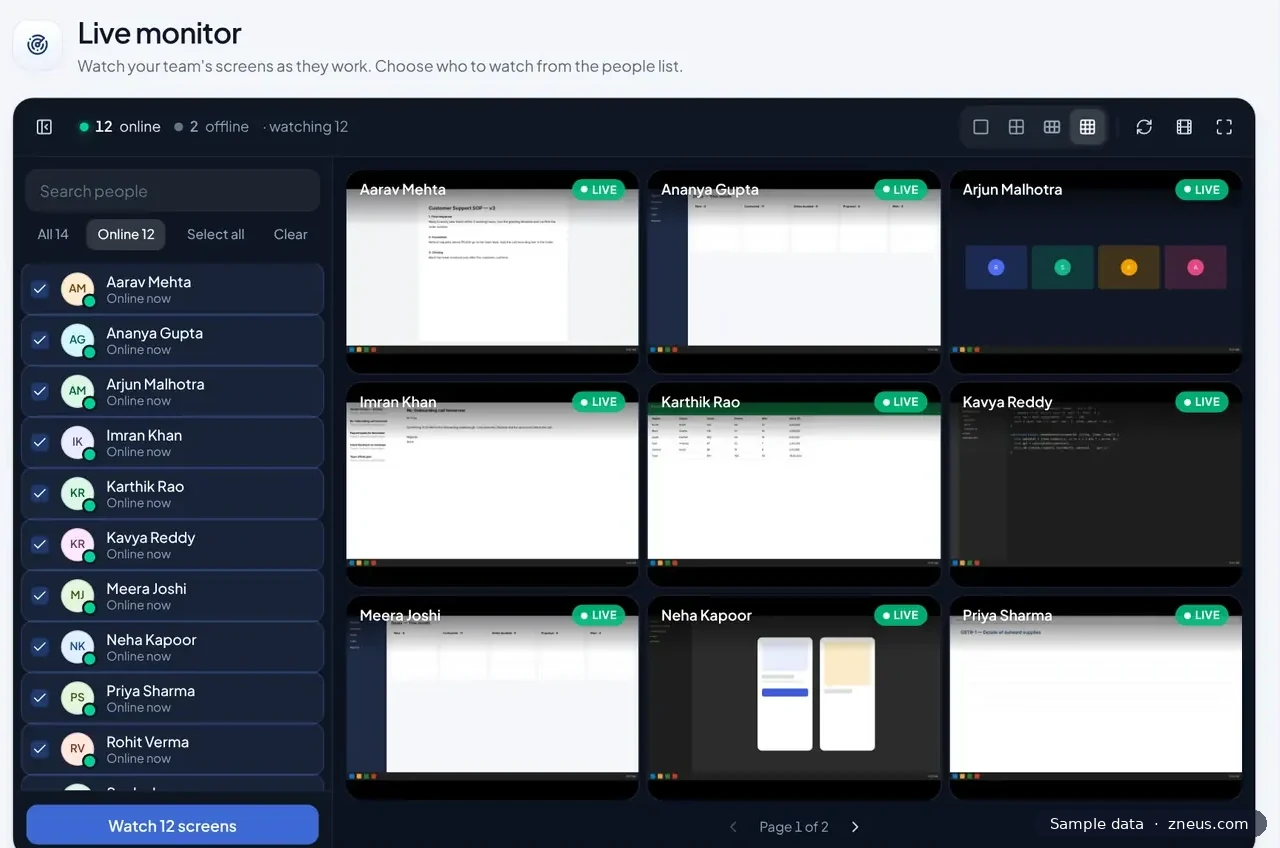
Open Live Monitor and you get a grid of every employee who is online right now. Click a tile to see that screen full size. It is the quickest way to answer "is the client file actually being worked on?" without walking over or calling.
- 7-day free trial, no card
- No keystroke logging
- Setup help in Hindi or English
How it works
The Zneus app on the employee's computer sends a small preview every two minutes and a tiny status check every 15 seconds. When someone opens Live Monitor, the app switches to full-size frames every 10 seconds for the people being watched, and goes back to quiet mode when the page is closed.
Included in the Complete plan (from ₹299 per employee per month). Not in Starter. See pricing.
- Screens go live within about 15 seconds of opening the page.
- Full-size images are sent only while someone is watching, so the employee's internet is not loaded all day.
- Polling stops when you switch to another browser tab.
- The same view works on the Zneus Android admin app.
What you see in the live screen monitoring screen
A real Zneus screen, filled with a made-up company's data. The numbers match the list.
1
2
3
4
- 1Who is online
Online and offline count for the whole team, live.
- 2Choose whose screens
Tick people in the list, or select everyone.
- 3Live tiles
Each tile is one person's screen, refreshed while you watch.
- 4Grid size
Change how many screens fit on the page, or go full screen.
Who can see which screens
The company admin sees everyone. With Team Access, a manager or team lead sees only the screens of their own teams, and only if the admin has switched live screens on for them. Employees always see the Zneus icon in their tray; there is no hidden mode.
Live screens or screenshots?
Live screens are for right now: a deadline, a new joiner's first week, a support queue. Screenshots are for looking back at the day. Most companies use both. If you only need the record, the Starter plan's screenshots may be enough.
Questions about live screen monitoring
Does live screen monitoring slow down the employee's PC?
Not noticeably. Full-size frames are sent only while a manager has that screen open, about one every 10 seconds. The rest of the day the app sends a small preview every two minutes.
Can I watch a work-from-home employee's screen?
Yes. The app sends the screen over the internet, so it works the same at home, in the office or on a client site. No VPN is needed.
Can I view live screens on my phone?
Yes, in the Zneus Admin app for Android.
Is live screen monitoring in the Starter plan?
No. Live screens are part of the Complete plan. Starter has automatic screenshots.
Works well with
Try it on your own team for 7 days
No credit card. We help you set it up, in Hindi or English.