
Daily screen recordings you can play back
Screenshots show moments. A recording shows the whole sequence: how a ticket was handled, where a form went wrong, what happened just before a mistake. Zneus Live Recording keeps the screen through the working day and turns it into one video per employee per day.
- 7-day free trial, no card
- No keystroke logging
- Setup help in Hindi or English
When companies switch it on
Recording uses more storage than screenshots, so most companies switch it on for specific teams or a period of time rather than for everyone forever. Common reasons are training new staff, quality checks in support and process teams, and settling a dispute about what happened on a client account.
Optional add-on. Ask us and we switch it on for your company. See pricing.
- One video per employee per day, played in the browser.
- Kept under your retention setting, then removed.
- Can be stored on your own FTP server or Amazon S3 on request.
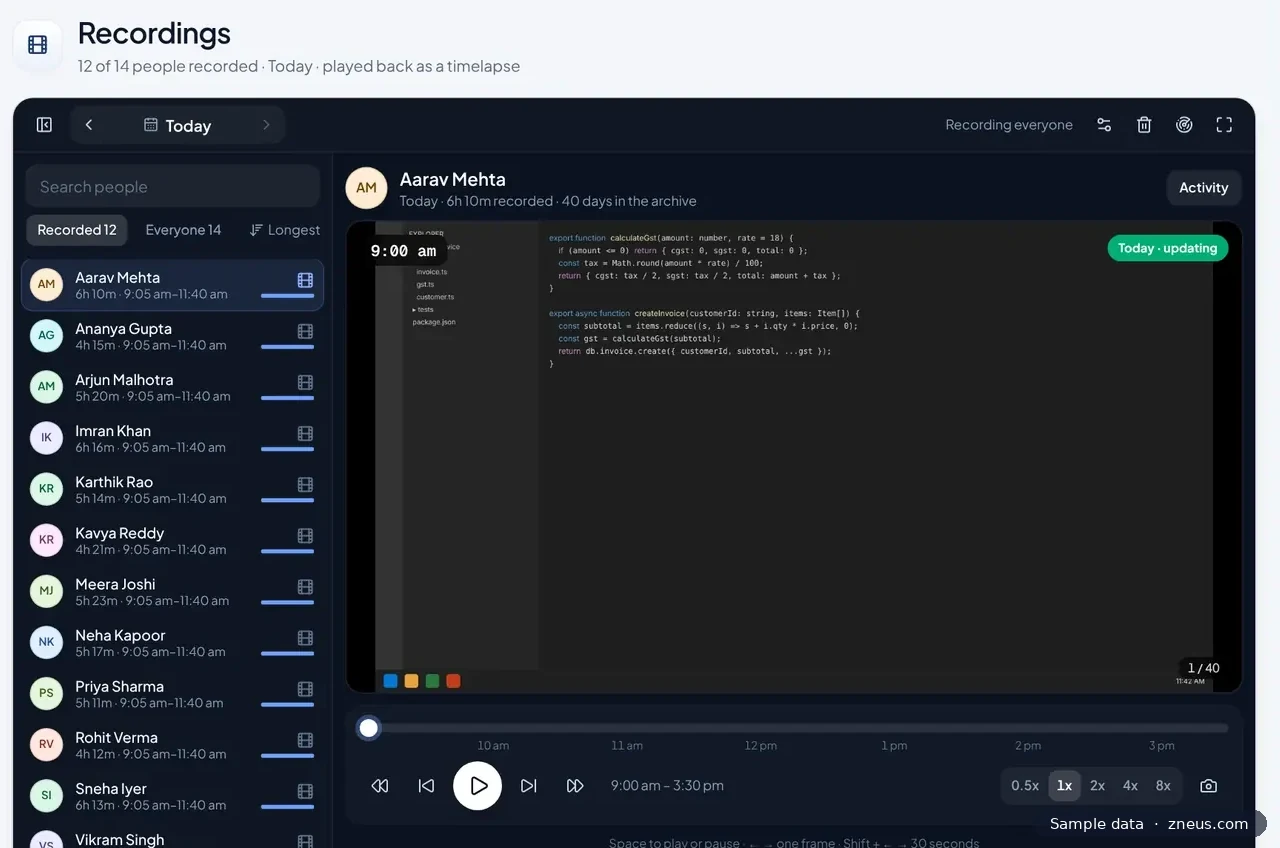
What you see in the screen recording screen
A real Zneus screen, filled with a made-up company's data. The numbers match the list.
1
2
3
4
- 1Who was recorded
Everyone recorded today, with hours and time range.
- 2The day as a video
Plays the day back as a timelapse of the screen.
- 3Jump to any time
Drag along the timeline from the first to the last minute.
- 4Speed
Play at 0.5x up to 8x.
Questions about screen recording
Is screen recording included in every plan?
No. Live Recording is an optional add-on. Ask us and we switch it on for your company.
Does recording record audio?
No. It is a recording of the screen only.
Where are recordings stored?
On Zneus storage by default, or on your own FTP server or Amazon S3 bucket if you ask.
Works well with
Try it on your own team for 7 days
No credit card. We help you set it up, in Hindi or English.