
Employees, departments and shifts in one list
Every report in Zneus starts from the employee list: profile, department, shift and salary. Get this right once and attendance, payroll and team access all follow from it.
- 7-day free trial, no card
- No keystroke logging
- Setup help in Hindi or English
Setting up
Register the company, add employees, and install the Zneus app on each PC. Each employee takes a couple of minutes. The Zneus team helps with setup during the 7-day trial, in Hindi or English.
Included in both plans: Starter (₹199) and Complete (from ₹299 per employee per month). See pricing.
- Profile, department, shift and salary per employee.
- Shifts set the expected start and end time for late and early-leaving reports.
- Lists export to CSV or print.
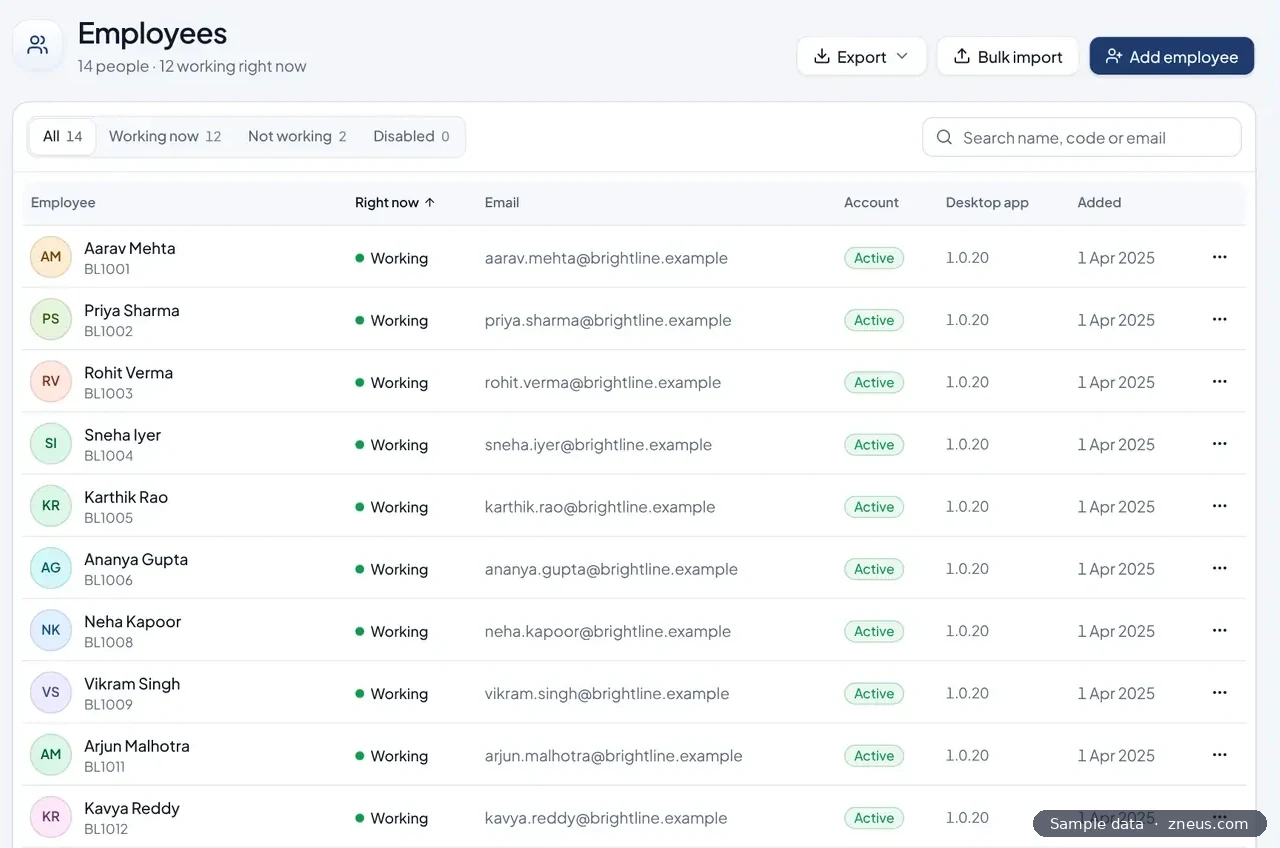
What you see in the employee management screen
A real Zneus screen, filled with a made-up company's data. The numbers match the list.
1
2
3
4
- 1Working now
Filter by working, not working or disabled.
- 2Live status
Whether each person is working right now.
- 3App version
Which version of the Zneus app each PC runs.
- 4Add or import
Add one employee or bulk import a list.
Questions about employee management
How long does it take to add employees?
A couple of minutes per employee, including installing the desktop app. We help during the trial.
Can employees have different shifts?
Yes. Each employee has a shift, and attendance reports use it for late arrival and early leaving.
Works well with
Try it on your own team for 7 days
No credit card. We help you set it up, in Hindi or English.