
Tasks and end-of-day reports in the same app
Employees keep a daily to-do list in the Zneus app and send an end-of-day report before they log off. You, a manager or a team lead can assign a task with a due date; it appears at the top of the employee's list with a desktop notification.
- 7-day free trial, no card
- No keystroke logging
- Setup help in Hindi or English
Why it sits next to monitoring
Time and activity tell you how long someone worked. The EOD report tells you what got done. Reading both together is fairer than either alone, especially for people whose work does not show up as app time.
Included in the Complete plan (from ₹299 per employee per month). Not in Starter. See pricing.
- Assigned tasks with due dates and desktop notifications.
- Daily EOD report from every employee.
- Managers see their own team's reports.
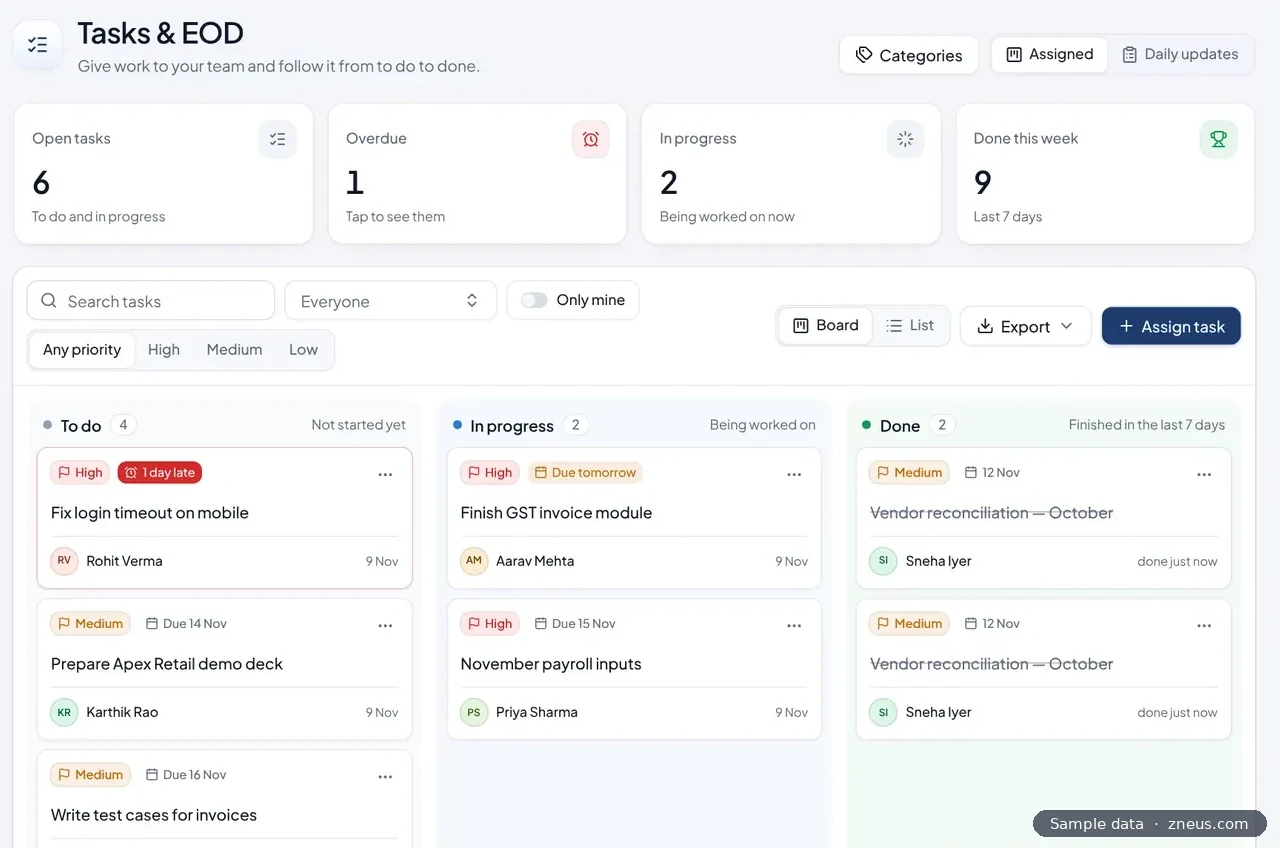
What you see in the tasks and eod reports screen
A real Zneus screen, filled with a made-up company's data. The numbers match the list.
1
2
3
4
- 1Open, overdue, done
Where the team's tasks stand this week.
- 2Priority and due date
High, medium or low, and how late a task is.
- 3Assign a task
Give work to anyone in your team, with a due date.
- 4Daily updates
End-of-day reports from each person.
Questions about tasks and eod reports
Is this a full project management tool?
No. It is a daily task list and EOD report. Teams that need boards, sprints or client billing usually keep their project tool and use Zneus for time, attendance and EOD.
Can a team lead assign tasks?
Yes, to the people in their own teams.
Works well with
Try it on your own team for 7 days
No credit card. We help you set it up, in Hindi or English.