
An HR helpdesk inside the app employees already use
"My attendance is wrong for the 14th." "Why is my salary less this month?" Instead of a WhatsApp message that gets lost, the employee raises a ticket from the Zneus desktop app, and the ticket shows the attendance day or salary slip it is about.
- 7-day free trial, no card
- No keystroke logging
- Setup help in Hindi or English
How tickets move
A ticket goes to the employee's team lead first, then to the manager and the admin, with reply targets and automatic escalation when nobody answers in time. Categories cover HR, finance, IT and other questions.
Included, and switched on for your company when you ask us. There is no extra setup on your side. See pricing.
- Raised from the desktop app, answered from the panel.
- The attendance day or salary slip is attached to the ticket.
- Escalates on its own if it is not answered.
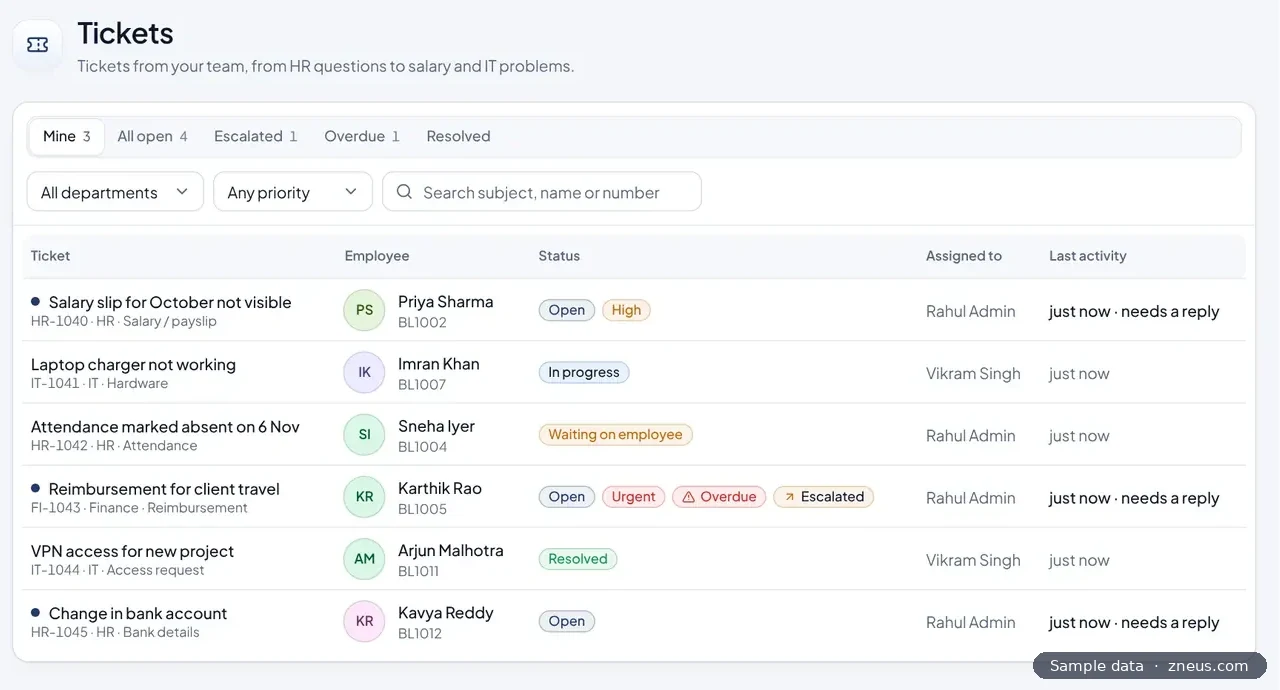
What you see in the employee helpdesk tickets screen
A real Zneus screen, filled with a made-up company's data. The numbers match the list.
1
2
3
4
- 1Mine, open, escalated
Filter by status, department and priority.
- 2HR, IT, finance
Salary, attendance, hardware or reimbursement questions.
- 3Escalated when late
Overdue tickets move up to the manager and admin.
- 4Assigned to
Who is handling it and when it was last touched.
Questions about employee helpdesk tickets
Do employees need another app for tickets?
No. Tickets are raised from the same Zneus desktop app they use for leave and breaks.
How do I turn on helpdesk?
Ask us and we switch it on for your company.
Who answers a ticket?
The employee's team lead first, then the manager and the admin if it is not answered in time.
Works well with
Try it on your own team for 7 days
No credit card. We help you set it up, in Hindi or English.