
Leave and resignations, out of WhatsApp
Employees apply for leave in the Zneus desktop app and see their own balance. Their team lead or manager approves, or you do, from the web panel or the Android app. Nobody can approve their own leave; it goes one level up.
- 7-day free trial, no card
- No keystroke logging
- Setup help in Hindi or English
Leave
Sick, casual and earned leave balances, approved or rejected with a reason. Approved leave shows on the team calendar and is used by attendance and payroll, so the same day is not counted three different ways.
Included in both plans: Starter (₹199) and Complete (from ₹299 per employee per month). See pricing.
- Apply from the app, approve from the panel or phone.
- Approval goes one level up; nobody approves their own leave.
- Holidays and weekly offs on the same calendar.
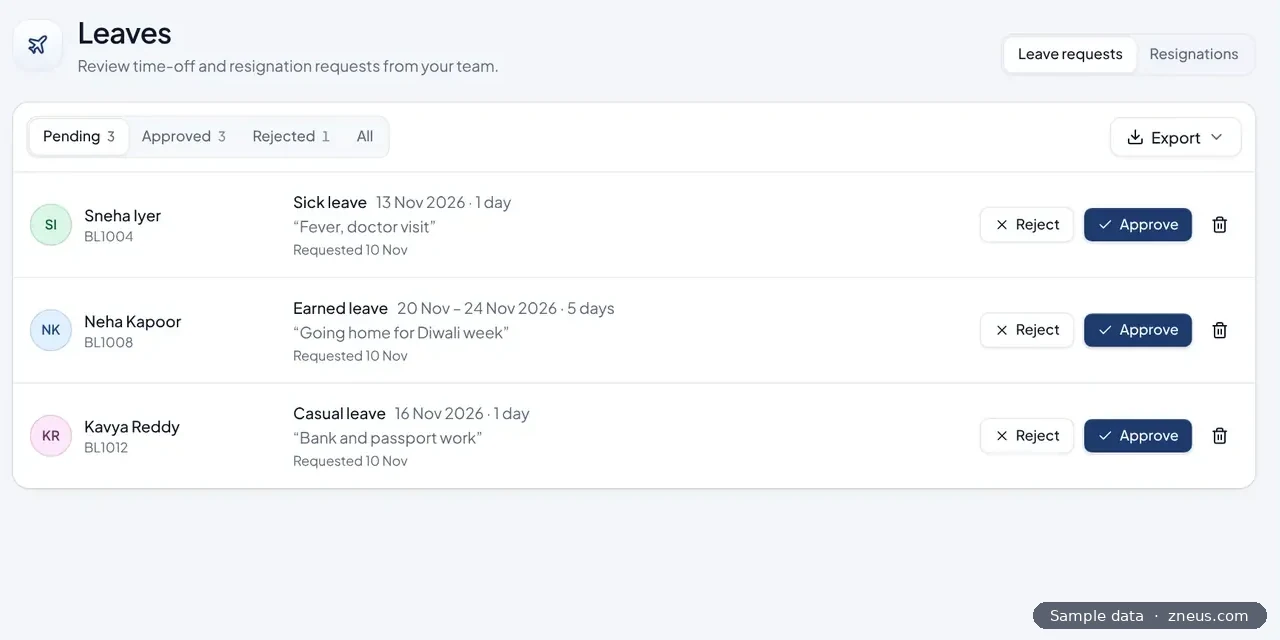
What you see in the leave management screen
A real Zneus screen, filled with a made-up company's data. The numbers match the list.
1
2
3
4
- 1Pending, approved, rejected
Every request in one list, filtered by status.
- 2Type, dates and reason
Sick, casual or earned leave, with the employee's reason.
- 3Approve or reject
One click, from the panel or the Android app.
- 4Resignations
Resignations have their own tab and two-step approval.
Resignations
Resignations go through two steps: the reporting manager first, then HR. The notice period is tracked, and every decision is logged with who made it.
Questions about leave management
Can employees see their leave balance?
Yes, in the Zneus desktop app.
Who approves leave?
The employee's team lead or manager, or the company admin. Nobody can approve their own leave.
Can I approve leave from my phone?
Yes, in the Zneus Admin app for Android.
Works well with
Try it on your own team for 7 days
No credit card. We help you set it up, in Hindi or English.