
Employee monitoring your team will not feel spied on by
Hybrid teams want to know what is expected of them, not to be watched. Zneus is built for open monitoring: the app is visible, nothing is hidden from the employee, and you decide how much to collect and for how long. That also makes it easier to follow India's DPDP Act.
- 7-day free trial, no card
- No keystroke logging
- Setup help in Hindi or English
What usually goes wrong
Monitoring that feels like spying
Hidden tools and keyloggers break trust, and good people leave.
Collecting more than you need
Years of screenshots nobody looks at, on a server nobody checks.
Employees who never see their data
So every number is a surprise, and an argument.
How Zneus helps
The parts of Zneus that matter most here. Each one opens a page with screenshots and details.
A simple checklist for open monitoring
Zneus gives you the settings. Following the DPDP Act also depends on how your company informs people and uses the data, so take your own legal advice.
- 1
Tell people first
Explain what is tracked and why, in writing, before you install the app.
- 2
Visible app only
Zneus runs with a tray or menu bar icon. There is no hidden mode.
- 3
No keylogging
Zneus notes whether there was keyboard or mouse activity in a minute, never what was typed.
- 4
Collect what you need
Switch screenshots and recordings off where they are not needed.
- 5
Keep it only as long as needed
Set how many months each kind of data is kept. Older data is deleted on its own.
- 6
Let employees see their own data
Each employee sees their hours, apps and websites under My report.
What it looks like in Zneus
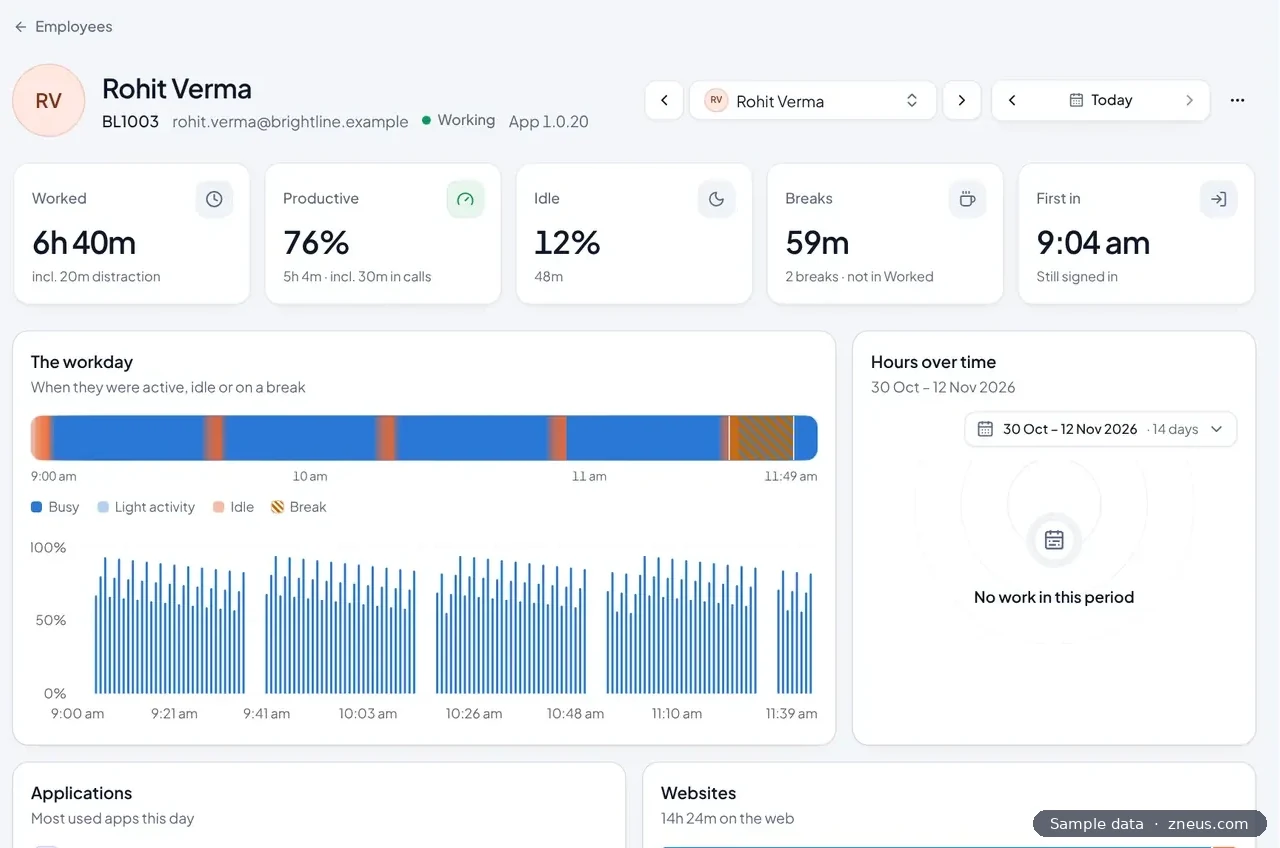
A real Zneus screen, filled with a made-up company's data. The numbers match the list.
1
2
3
4
- 1The day in numbers
Worked, productive, idle, breaks and first sign-in.
- 2The workday bar
Busy, light activity, idle and breaks across the day.
- 3Input per minute
How much keyboard and mouse input there was, minute by minute. Never the keys.
- 4Person and day
Move between people and dates without leaving the page.
Questions people ask
How do I track productivity in a hybrid team without being intrusive?
Track outcomes and time patterns, not every screen. In Zneus, keep activity and attendance on, switch screenshots off or to a long interval, show employees their own report, and let managers see only their own team.
Is Zneus compliant with the DPDP Act?
Zneus is built for open, consent-based monitoring: no keylogging, no hidden mode, retention you control. Compliance also depends on how your company informs employees and uses the data, so take your own legal advice.
Does Zneus record keystrokes or passwords?
No. It records whether there was input in each minute, not what was typed.
Can employees see what is recorded about them?
Yes. The My report section of the app shows their own hours, apps, websites and time split.
Where is the data stored?
On Zneus servers by default. On request, tracking data can go to your own database and screenshots to your own storage.
Try it on your own team for 7 days
No credit card. We help you set it up, in Hindi or English.