Employee Attendance Management Software: Features Every Business Should Know
Managing employee attendance is an important part of running a successful business. Whether a company has 10 employees or 500, keeping accurate attendance records helps managers organise daily operations, calculate working hours, manage leave requests, and improve workforce productivity. However, using manual registers, spreadsheets, or separate HR tools can make attendance management time-consuming and difficult.
This is where Employee Attendance Management Software becomes useful. It helps businesses record attendance, monitor working hours, manage employee leave, and generate reports through a centralised digital system. Instead of maintaining multiple records manually, HR teams can access important attendance information from one dashboard.
Modern attendance systems offer features such as automatic check-in and check-out tracking, late arrival alerts, overtime calculations, leave management, and detailed attendance reports. These tools help businesses reduce administrative work, minimise record-keeping errors, and make better workforce management decisions.
In this guide, we will explore the essential features of employee attendance software, its benefits, and how businesses can choose the right solution for their requirements.
What Is Employee Attendance Management Software?
Employee Attendance Management Software is a digital tool that helps organisations record, organise, and manage employee attendance information. It allows HR professionals and managers to check employee attendance status, review working hours, monitor late arrivals, and maintain leave records more efficiently.
Traditional attendance methods often depend on paper registers or spreadsheets. As a business grows, maintaining these records manually can lead to incorrect entries, missing information, and delays in preparing monthly reports.
An automated attendance system simplifies these processes by collecting attendance information and presenting it in an organised format. Depending on the software, businesses can use desktop applications, web dashboards, biometric devices, or other supported check-in methods.
For companies looking to improve daily workforce management, employee attendance software can make attendance records easier to access, review, and maintain.
10 Important Features Every Business Should Know
1. Automatic Check-In and Check-Out Tracking
One of the most useful features of Employee Attendance Management Software is automatic check-in and check-out tracking. It records when employees start and finish their working sessions using the methods supported by the system.
HR teams can review attendance timestamps without depending entirely on handwritten registers or manual spreadsheet updates.
For example, a manager can check whether an employee logged in at the scheduled start time and when the employee's working session ended. This information helps businesses maintain consistent attendance records and identify entries that may require verification.
Automatic attendance tracking is particularly helpful for organisations with large teams, multiple departments, or changing work schedules.
2. Real-Time Attendance Dashboard
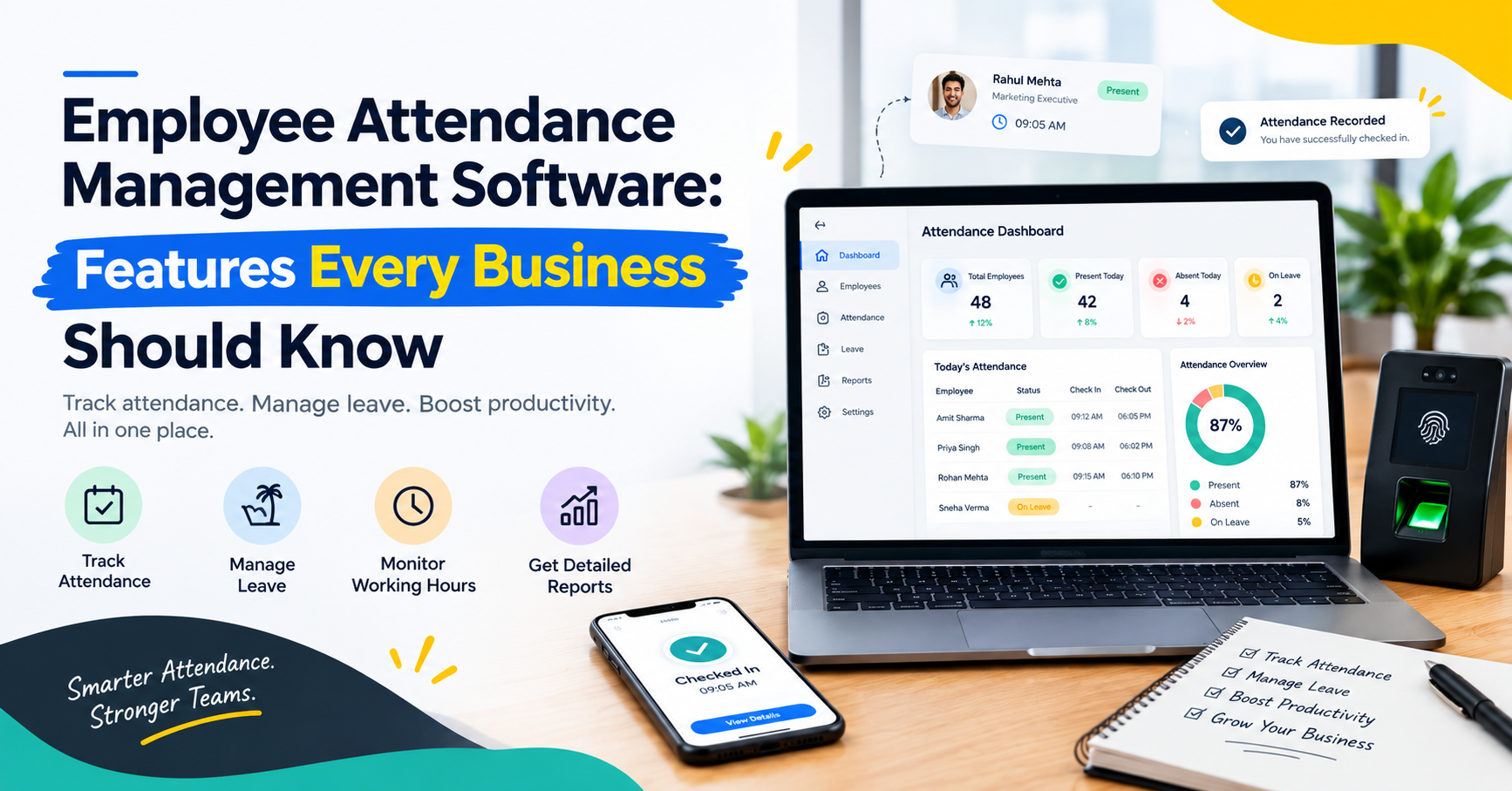
A centralised attendance dashboard gives managers a quick overview of workforce attendance. Instead of checking each employee's record separately, authorised users can review important information from one place.
Depending on the software, the dashboard may display:
Total registered employees
Employees present today
Employees marked absent
Employees currently on approved leave
Check-in and check-out times
Attendance summaries and trends
An organised dashboard helps HR teams identify attendance gaps and plan daily operations more effectively. It also reduces the time spent collecting information from different sources.
3. Working Hours and Overtime Calculation
Tracking working hours is another essential function of an attendance system. The software can use recorded attendance timestamps and configured work schedules to calculate total working time.
Some systems also support overtime tracking, late arrival records, and early departure alerts.
For example, if an employee's scheduled shift is from 9:00 AM to 6:00 PM, the system can help the HR team compare recorded attendance with the expected schedule. Any overtime or attendance discrepancy can then be reviewed according to company policy.
Accurate working-hour records can support payroll preparation and workforce planning. Businesses should ensure that their attendance rules, break policies, and overtime calculations are configured correctly.
4. Digital Leave Management
Managing employee leave through emails, messaging applications, and spreadsheets can create confusion. HR teams may struggle to track approvals, remaining leave balances, and overlapping employee absences.
Employee Attendance Management Software with a leave management feature can simplify this process.
Important capabilities may include:
Digital leave applications
Leave approval and rejection workflows
Leave balance tracking
Different leave categories
Leave history and records
Team leave calendars
Employees can submit leave requests digitally, while authorised managers can review and approve them according to company policies.
By connecting attendance and leave records, businesses can maintain more organised employee information and reduce repetitive administrative work.
5. Late Arrival and Absence Alerts
Late arrivals and unplanned absences can affect daily operations, particularly when teams depend on scheduled shifts or customer support coverage.
An attendance system may provide alerts when an employee checks in after the scheduled start time or when an expected attendance record is missing.
These alerts help HR teams and managers identify situations that need attention. However, an alert should not automatically be treated as proof of misconduct. Managers should review the circumstances, approved schedule changes, and any valid explanations before taking action.
A consistent attendance process helps businesses apply their policies fairly across the organisation.
6. Attendance Reports and Analytics
Reports help businesses understand attendance patterns instead of relying on scattered records.
A good attendance reporting feature can provide daily, weekly, and monthly summaries. Some platforms also allow businesses to export reports into formats such as PDF or Excel.
Useful attendance reports may include:
Daily attendance summaries
Monthly employee attendance records
Late arrival and early departure reports
Overtime summaries
Leave history
Absence trends
These reports can support HR reviews, payroll preparation, and workforce planning. Managers can use the information to identify recurring scheduling problems and improve attendance procedures.
7. Break Management
Employee breaks are an important part of maintaining a structured work schedule. Businesses need clear break policies that are applied consistently and comply with applicable requirements.
Some attendance and workforce management systems allow administrators to define break rules, record break durations, and review break logs.
This information can help managers understand how scheduled working time is organised and identify discrepancies that require clarification.
Break tracking should support fair workforce management rather than unnecessary surveillance. Employees should understand the applicable policies and how their records are used.
8. Employee and Department-Wise Records
Businesses often have multiple departments, teams, shifts, and reporting managers. Maintaining attendance information for everyone in one spreadsheet can become difficult as the organisation expands.
Employee Attendance Management Software can help organise records by employee, department, or team, depending on the platform's capabilities.
For example, an HR manager may need to review attendance for the sales department, while a team leader may only need access to the records of their own team.
Role-based access can help ensure that authorised users see the information relevant to their responsibilities. This makes attendance management more organised and can support better data security.
9. Integration With Payroll and HR Processes
Attendance information often contributes to payroll preparation, overtime review, and employee record management.
When attendance records are maintained separately from other HR processes, staff may need to enter the same information multiple times. This increases administrative work and creates opportunities for errors.
An integrated workforce management platform can bring attendance, leave, working hours, and related employee records into a more connected workflow.
Before choosing a solution, businesses should check whether it supports their payroll requirements, exports, integrations, and existing HR processes. They should also verify which calculations are automated and which require manual review.
10. Employee Productivity and Activity Insights
Some workforce management platforms combine attendance tracking with productivity reporting and application usage insights.
These additional features can help managers understand work patterns, review activity records, and identify potential workflow issues. However, attendance and productivity are different measurements: an employee's presence does not automatically indicate the quality or value of their work.
Businesses should use activity insights responsibly, explain monitoring policies clearly, and assess performance using relevant job outcomes rather than relying on a single metric.
When used appropriately, attendance and productivity information can help managers identify obstacles, improve processes, and provide better support to employees.
Benefits of Employee Attendance Management Software
Implementing an attendance system can provide several practical benefits for businesses.
Reduced Manual Work
Automated records reduce the need to update attendance registers and spreadsheets repeatedly. HR teams can spend less time collecting information and more time on important employee-related activities.
More Organised Attendance Records
A centralised system makes attendance information easier to locate and review. It also helps businesses maintain a consistent process for recording employee attendance.
Better Leave Coordination
Digital leave requests and approval workflows help managers review employee availability and plan team schedules more effectively.
Easier Payroll Preparation
Accurate attendance, working-hour, and overtime records can support payroll preparation. Final salary calculations should still follow the organisation's policies and applicable rules.
Improved Workforce Planning
Attendance summaries help businesses understand recurring absence patterns, scheduling gaps, and staffing requirements.
Faster Reporting
Daily and monthly reports make it easier for authorised users to review records without compiling information manually from multiple files.
How to Choose the Right Attendance Software for Your Business
Not every business requires the same attendance features. A small company may need basic attendance and leave tracking, while a larger organisation may require multiple shifts, department-level access, integrations, and advanced reporting.
Consider these factors before selecting a solution:
1. Business requirements: Identify whether you need basic attendance records, overtime calculations, leave management, shift scheduling, or additional workforce management features.
2. Ease of use: Choose a system that employees, managers, and HR teams can use without unnecessary complexity.
3. Reporting capabilities: Check whether the software provides the attendance summaries and export formats your business needs.
4. Scalability: Ensure the solution can accommodate your expected team growth and organisational structure.
5. Data security and privacy: Review access controls, data handling practices, retention settings, and the vendor's privacy documentation.
6. Integration options: Check whether the software works with your existing payroll or HR processes.
7. Pricing and support: Compare the total cost, available features, onboarding assistance, and customer support before making a decision.
A short product demonstration or trial can help your team confirm whether the system meets its practical requirements.
How Zneus Supports Attendance and Workforce Management
Businesses looking for a connected workforce management solution can explore Zneus. Its platform brings together time and attendance tracking, leave management, break management, productivity analytics, and reporting features.
The time and attendance functionality helps businesses review login and logout records, working hours, overtime, and late arrivals. Leave management supports digital leave requests and approval workflows, while reporting features help authorised users review employee and workforce information.
Zneus also offers a centralised dashboard and additional workforce productivity tools. Businesses should review the available features and plan details to confirm which capabilities best match their requirements.
By bringing relevant employee management processes together, a platform such as Zneus can help reduce reliance on scattered records and support a more organised approach to workforce administration.
Best Practices for Implementing Attendance Software
Choosing the right software is only one part of successful attendance management. Businesses should also establish clear policies and communicate them to employees.
Follow these practices:
Define working hours, shift schedules, and break policies clearly.
Explain how attendance records are collected and used.
Train HR staff, managers, and employees on the system.
Review attendance exceptions before making decisions.
Restrict employee data access to authorised users.
Check records periodically for errors or configuration issues.
Follow applicable employment, privacy, and data protection requirements.
Evaluate whether the software is reducing administrative work and improving record accuracy.
A transparent process helps employees understand expectations and gives managers reliable information for daily planning.
Conclusion
Employee attendance is more than a daily record of who arrived at work. Accurate attendance information helps businesses organise schedules, manage leave, review working hours, prepare payroll records, and make better workforce decisions.