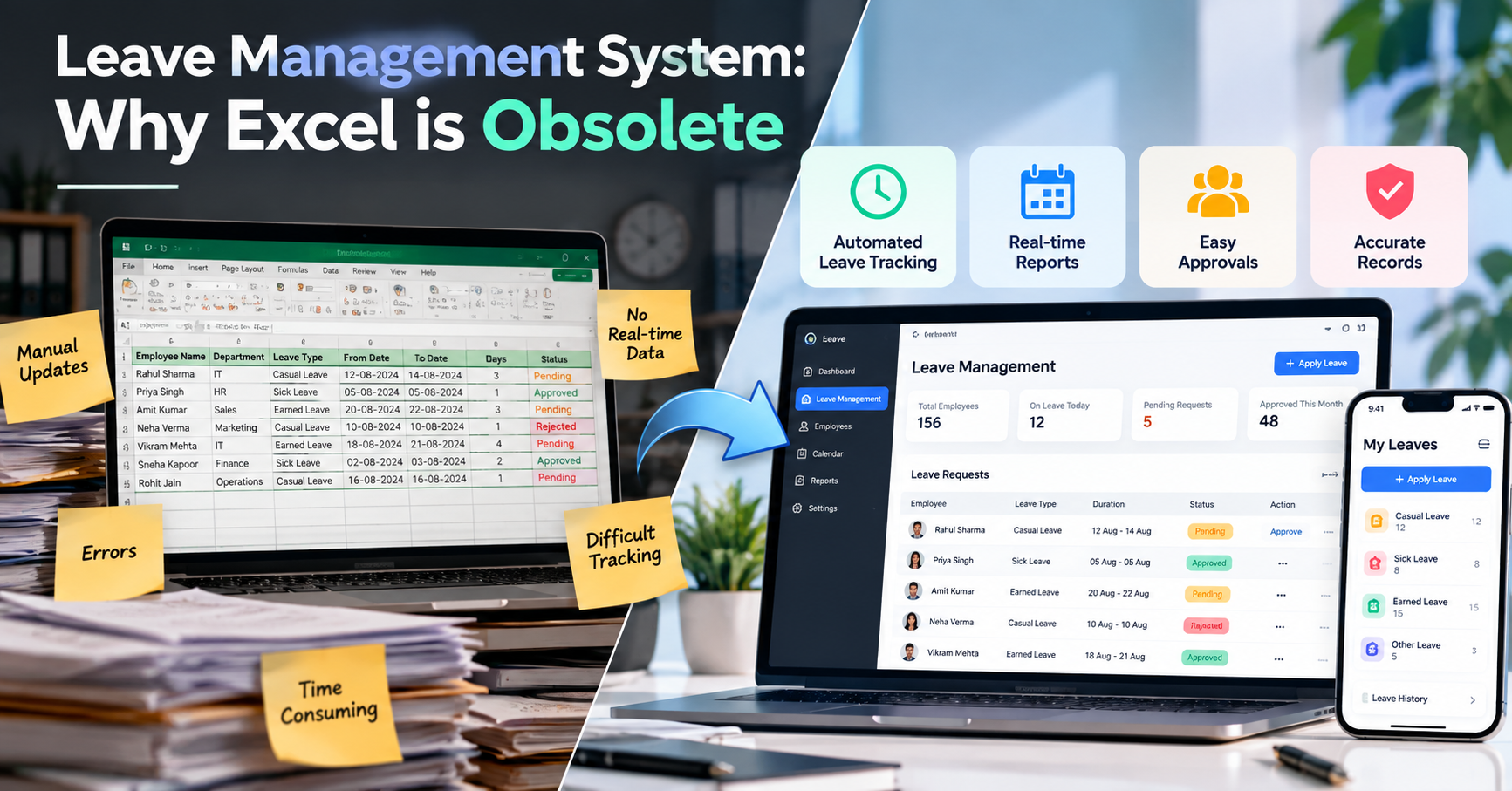
Leave Management System: Why Excel Is Obsolete
Managing employee leave may look simple when a company has only a few employees. But as the workforce grows, maintaining leave records in Excel becomes increasingly difficult.
HR teams often have to update spreadsheets manually, check leave balances, verify approval status, maintain attendance-related information and prepare reports. A small mistake in one cell can create confusion across the entire leave record.
This is why modern organizations are moving from traditional spreadsheets toward a Leave Management System that can automate leave tracking, approvals, employee records and reporting.
Why Companies Still Use Excel for Leave Management
Excel is familiar, flexible and easy to start with. Many small businesses initially create a simple spreadsheet containing:
- Employee names
- Departments
- Leave types
- Leave dates
- Number of leave days
- Approval status
- Leave balances
For a small team, this may work temporarily.
However, when the number of employees and leave requests increases, the spreadsheet becomes harder to maintain.
Multiple employees may request leave at the same time, managers may need to approve requests, and HR may need updated information immediately.
This is where the limitations of Excel for leave management become visible.
1. Manual Leave Tracking Takes Too Much Time
One of the biggest problems with Excel-based leave management is manual data entry.
HR employees may need to repeatedly update spreadsheets whenever an employee:
- Applies for leave
- Cancels leave
- Changes leave dates
- Gets leave approved
- Gets leave rejected
- Uses a particular leave balance
Every manual update creates another opportunity for human error.
A Leave Management System can automate many of these processes, reducing repetitive administrative work.
2. Excel Makes Employee Leave Tracking Difficult
When leave information is stored across large spreadsheets, finding the right employee record can become time-consuming.
HR may need to search through rows and columns to determine:
- How many leaves an employee has taken
- Which leaves are pending
- Which requests have been approved
- Remaining leave balance
- Previous leave history
- Department-wise leave information
A modern employee leave management system can organize this information into a centralized dashboard.
Instead of searching through spreadsheets, HR can access relevant information from a structured system.
3. No Real-Time Leave Visibility
Another major limitation of Excel is the lack of real-time visibility.
Imagine an employee submits a leave request today.
If the information is stored in a spreadsheet, someone may need to manually update the record after approval.
This creates a gap between the actual leave request and the information available in the spreadsheet.
A Leave Management System can provide real-time information about leave requests, approvals and employee leave records.
Managers can see pending requests, while HR can maintain centralized records.
4. Manual Errors Can Create Problems
Spreadsheets depend heavily on accurate data entry.
A wrong date, incorrect number of leave days or accidentally modified cell can affect employee records.
For example:
Employee Leave: 5 Days
Recorded Leave: 8 Days
Even a small mistake can create confusion when HR calculates leave balances or prepares monthly reports.
With an automated leave management system, calculations and workflows can be standardized, helping reduce dependency on manual spreadsheet updates.
5. Leave Approval Becomes Complicated
Traditional Excel-based leave tracking usually separates the request from the approval process.
An employee may send a message or email requesting leave.
The manager approves it.
Then HR updates the Excel sheet.
This creates unnecessary steps.
A modern employee leave management system can connect the leave request and approval workflow within the same platform.
A typical process can look like:
Employee → Leave Request → Manager Approval → HR Record → Leave Balance Update
This creates a more structured workflow for organizations.
6. Difficult to Track Leave History
Employee leave history becomes increasingly important as organizations grow.
HR may need to check an employee's previous leave requests, leave types and approval records.
With Excel, this information may be spread across multiple sheets or files.
A centralized leave management system can maintain employee leave history in one place.
This allows HR and authorized managers to review historical records more efficiently.
7. Reporting Becomes Time-Consuming
HR teams frequently need reports such as:
- Employees currently on leave
- Pending leave requests
- Approved leaves
- Rejected requests
- Department-wise leave usage
- Monthly leave statistics
- Employee leave history
Creating these reports manually in Excel can take considerable time.
With an automated HR leave management system, reporting can become part of the regular workflow.
Instead of manually preparing every report, HR can access organized information through dashboards and reporting tools.
Excel vs. Leave Management System
| Feature | Excel-Based Tracking | Leave Management System |
|---|---|---|
| Leave Entry | Manual | Digital |
| Leave Approval | Separate process | Integrated workflow |
| Employee Leave Tracking | Manual | Centralized |
| Leave Balance | Manual calculation | Automated |
| Real-Time Visibility | Limited | Available through dashboard |
| Leave History | Spreadsheet-based | Centralized records |
| Reports | Manual preparation | Automated/structured |
| Error Risk | Higher with manual entry | Reduced through automation |
| Accessibility | File dependent | System-based access |
| Scalability | Becomes difficult with growth | Designed for growing teams |
What a Modern Leave Management System Can Offer
A modern Leave Management System can bring multiple HR processes together.
Automated Leave Tracking
Leave requests and employee leave records can be managed digitally instead of maintaining multiple spreadsheets.
Easy Leave Approvals
Managers can review and approve or reject leave requests through a structured workflow.
Real-Time Dashboard
HR and authorized managers can quickly view important information such as:
Total Employees | Employees on Leave | Pending Requests | Approved Leaves
Accurate Employee Records
Centralized records can make it easier to maintain employee leave history and balances.
Leave Reports
Organizations can generate structured reports without manually collecting information from different Excel sheets.
Employee Self-Service
Employees can submit leave requests and check their leave information without depending completely on HR for every update.
From Spreadsheet Management to Automated HR Management
The biggest difference between Excel and a dedicated Leave Management System is automation.
Excel primarily acts as a place to store information.
A leave management platform can become part of the actual HR workflow.
Instead of:
Employee → Email/Message → Manager → HR → Excel Update
the process can become:
Employee → Digital Leave Request → Manager Approval → Automated Record Update
This reduces unnecessary manual steps and gives HR better visibility into employee leave activity.
Is Excel Completely Useless?
Not necessarily.
Excel can still be useful for small teams, temporary records, data analysis and simple administrative tasks.
The problem begins when an organization tries to use Excel as a complete employee leave management system while the number of employees, departments and leave requests continues to grow.
At that stage, a dedicated system can provide a more structured approach.
The Future of Leave Management Is Automated
Modern HR teams are increasingly looking for ways to reduce repetitive administrative work and improve employee experience.
A Leave Management System can help organizations move away from manual spreadsheets and toward a more connected HR workflow.
With automated leave tracking, digital approvals, centralized employee records, real-time visibility and structured reporting, organizations can manage employee leave more efficiently.
The goal is simple:
Less Manual Work.
Better Visibility.
Fewer Errors.
Smarter Leave Management.
Conclusion
Excel has been a useful tool for managing employee information for many years. But as organizations grow, spreadsheet-based leave management can become difficult to maintain.
Manual updates, calculation errors, limited visibility, complicated approvals and time-consuming reporting can make traditional leave tracking inefficient.
A modern Leave Management System provides a more organized way to manage employee leave, automate approval workflows and maintain centralized records.
For organizations looking to modernize their HR operations, moving from spreadsheets to automated employee leave management can be an important step toward a smarter and more efficient workplace.