
Break rules that match how your office works
Lunch, tea, prayer, personal: set up the breaks your office actually uses. For each one choose the length, how many times a day it is allowed and whether the employee has to give a reason.
- 7-day free trial, no card
- No keystroke logging
- Setup help in Hindi or English
How it works for employees
The employee starts a break from the Zneus app and sees only the break types you allow. Break time is kept apart from idle time, so a lunch break never shows up as an unproductive hour.
Included in both plans: Starter (₹199) and Complete (from ₹299 per employee per month). See pricing.
- Daily limits are checked on the server, not just in the app.
- A reminder when a break runs over its time.
- Break logs per employee and per day, with over-time alerts.
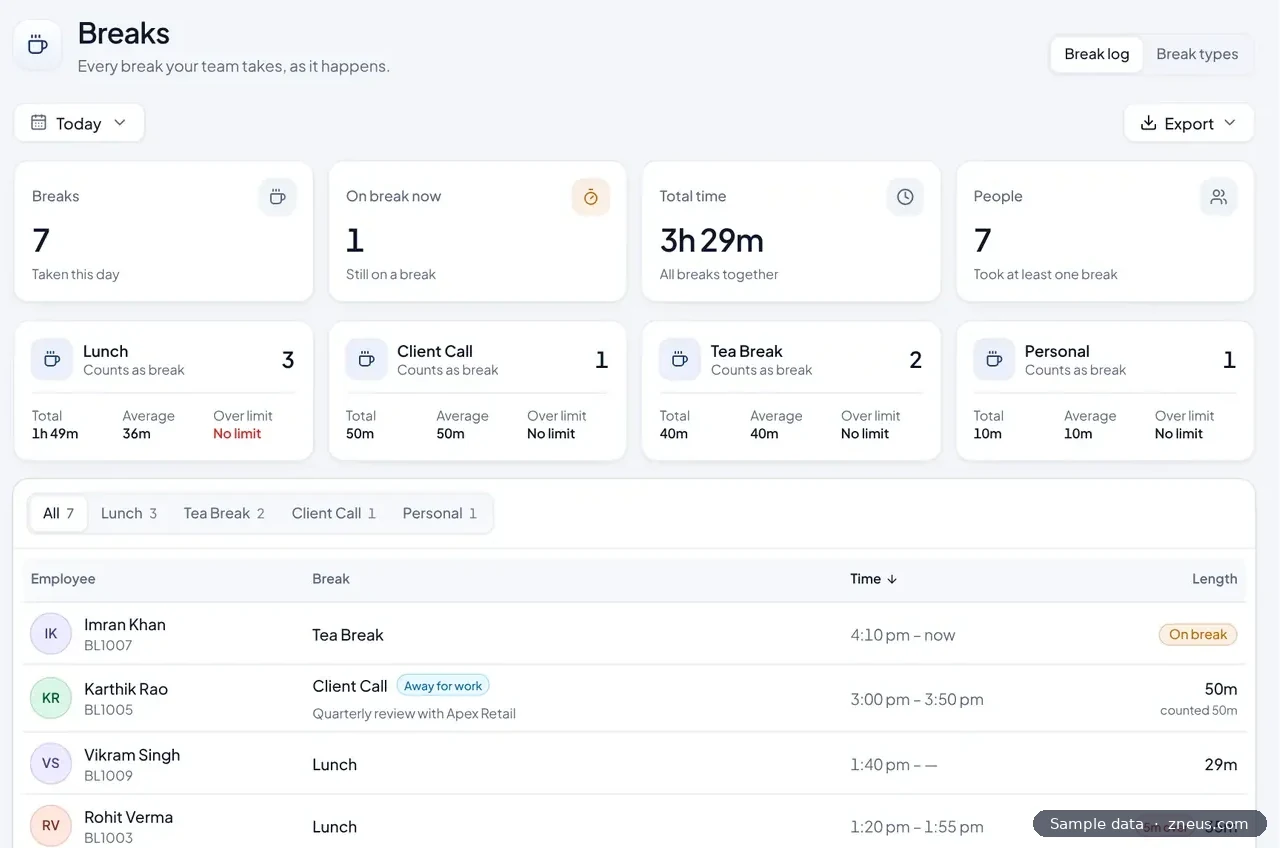
What you see in the break management screen
A real Zneus screen, filled with a made-up company's data. The numbers match the list.
1
2
3
4
- 1On a break now
Who is on a break right now, and total break time today.
- 2Break types
Lunch, tea, client call or your own types, with limits.
- 3Away for work
Breaks like client calls can count as work and show separately.
- 4Over time
Breaks that ran past their limit are marked.
Questions about break management
Can I limit how many tea breaks are allowed?
Yes. Each break type has its own length and number of times per day.
Is break time counted as idle?
No. Breaks are recorded separately from idle time.
What happens if a break runs over?
The employee gets a reminder and the break is marked as over time in the break log.
Works well with
Try it on your own team for 7 days
No credit card. We help you set it up, in Hindi or English.