
Generate monthly salary slips
Zneus works out each person's salary from present days, approved leave and holidays. You check it, generate the slips and export them.
Steps
-
Add salary details
Open each employee in Employees and fill in their salary, earnings and deductions.
-
Set payroll rules
Open Settings › Payroll rules. Choose whether per-day salary is based on calendar days or working days, and switch the sandwich rule and carry forward leave on or off.
-
Open Payroll
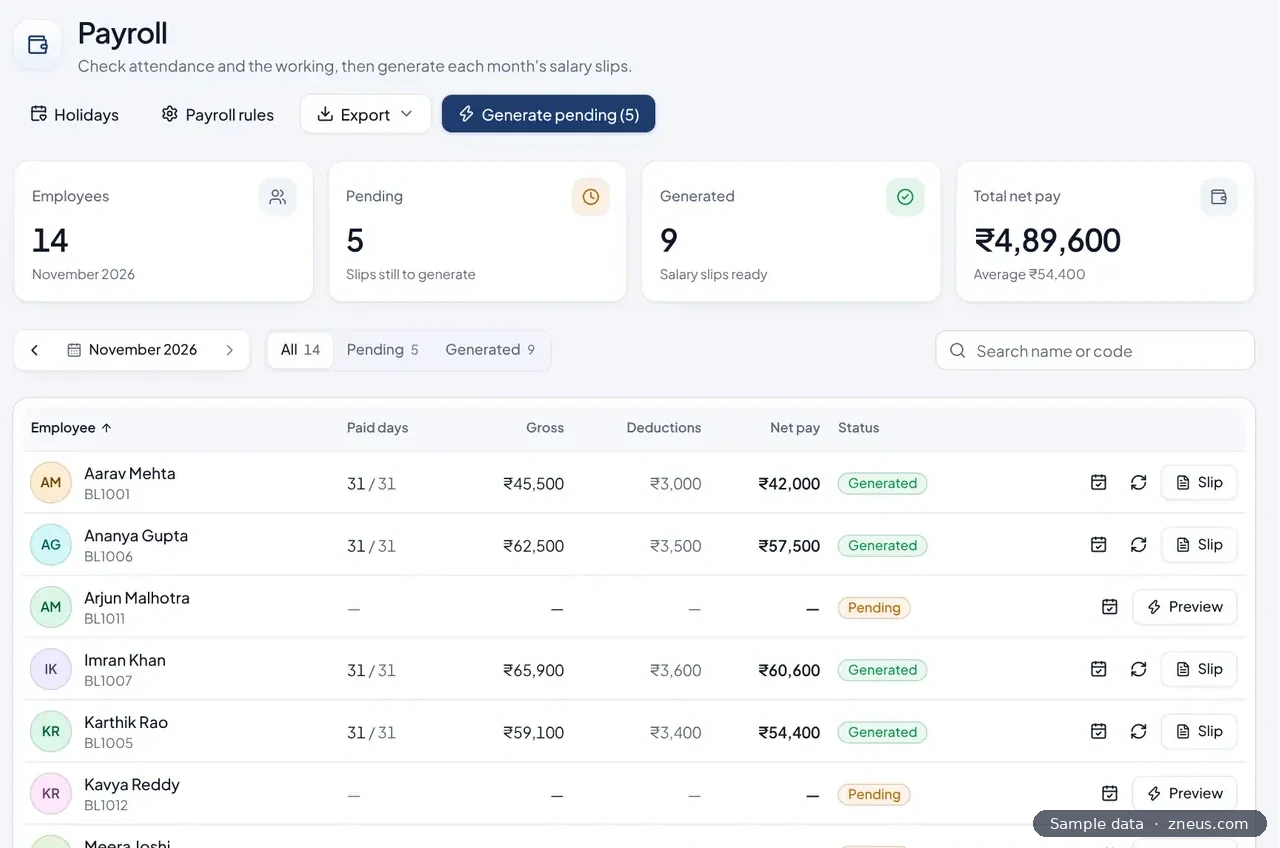
Open Payroll and pick the month. You see paid days, gross, deductions and net pay for each person.
-
Generate
Choose Generate pending to make every pending slip, or generate them one at a time.
-
Check and export
Open any slip to preview it. Use Export to download the month.
Good to know
- Rule changes apply the next time salaries are generated. Slips already generated stay as they are, unless you work one out again.
- Zneus is not a full statutory payroll system. Check PF, ESI, TDS and professional tax with your CA.
Questions about this
An employee says their salary is wrong. What do I do?
Fix the attendance or leave, then choose Work out again on their row. The slip is rebuilt from today's attendance, leave and salary structure.
Is payroll in the Starter plan?
No. Payroll is in the Complete plan.
Related
Stuck on a step?
Tell us where. We help you set Zneus up on a call, in Hindi or English.