
For e-commerce catalogue, order and support teams
Listing, order processing and customer support are screen work done against a deadline, often on rotating shifts. Zneus shows who is on which marketplace dashboard, keeps breaks in check, and collects an end-of-day count of what was done.
- 7-day free trial, no card
- No keystroke logging
- Setup help in Hindi or English
What usually goes wrong
Sale days need everyone at their desk
And you find out who was missing after the orders are late.
Output is easy to count but not collected
Listings done, orders processed, tickets closed: it is in nobody's report.
Seller dashboards look the same as browsing
Generic tools cannot tell them apart.
How Zneus helps
The parts of Zneus that matter most here. Each one opens a page with screenshots and details.
What it looks like in Zneus
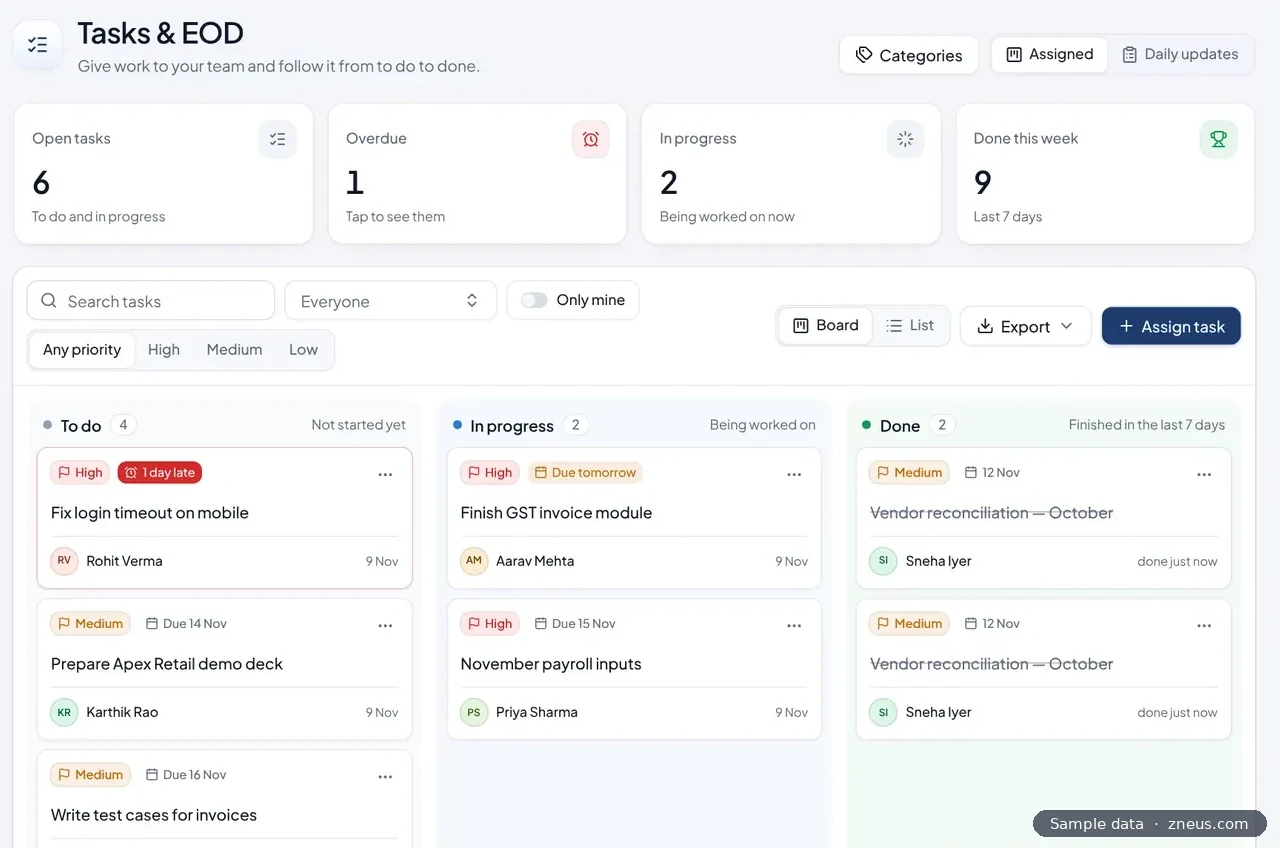
A real Zneus screen, filled with a made-up company's data. The numbers match the list.
1
2
3
4
- 1Open, overdue, done
Where the team's tasks stand this week.
- 2Priority and due date
High, medium or low, and how late a task is.
- 3Assign a task
Give work to anyone in your team, with a due date.
- 4Daily updates
End-of-day reports from each person.
Questions people ask
Can Zneus tell marketplace seller dashboards apart from shopping?
Seller dashboards usually have their own web address (for example sellercentral.amazon.in), and you can mark that address productive in website rules.
Try it on your own team for 7 days
No credit card. We help you set it up, in Hindi or English.