
Approve or reject a leave request
Employees apply for leave from the Zneus app on their PC. You see the request in the panel, approve or reject it, and attendance and payroll pick up the result.
Steps
-
The employee applies
In the Zneus app on their PC, the employee opens Leave, chooses Apply New Leave, picks the leave type and dates, and adds a reason.
-
Open Leaves
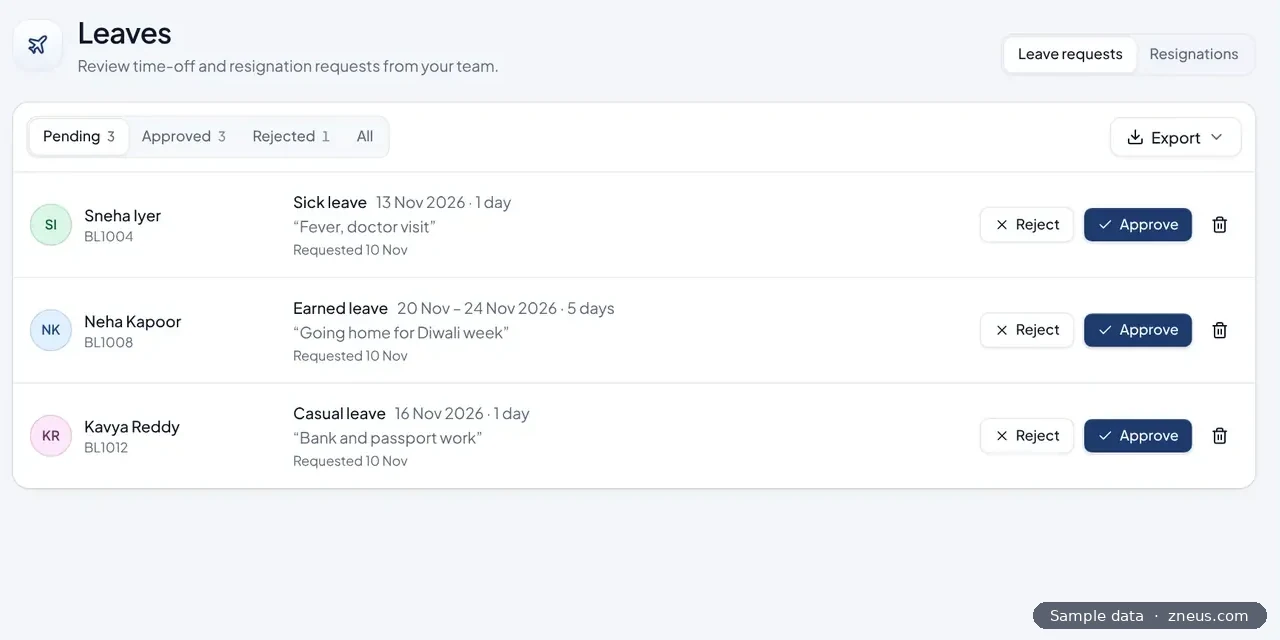
In the panel, open Leaves. New requests are under Pending.
-
Check the request
Each request shows the leave type, the dates, how many days and the reason.
-
Approve or reject
Choose Approve or Reject. Approved leave shows on the team calendar and is not counted as absent.
Good to know
- Resignation requests are on the same screen, under Resignations.
- Managers with Team Access see requests only from their own teams.
Questions about this
Can I approve leave from my phone?
Yes, from the Zneus Admin app on Android. You can also connect ChatGPT or Claude and approve leave by chatting, if you give that key permission.
Related
Stuck on a step?
Tell us where. We help you set Zneus up on a call, in Hindi or English.