
Give a manager or team lead their own login
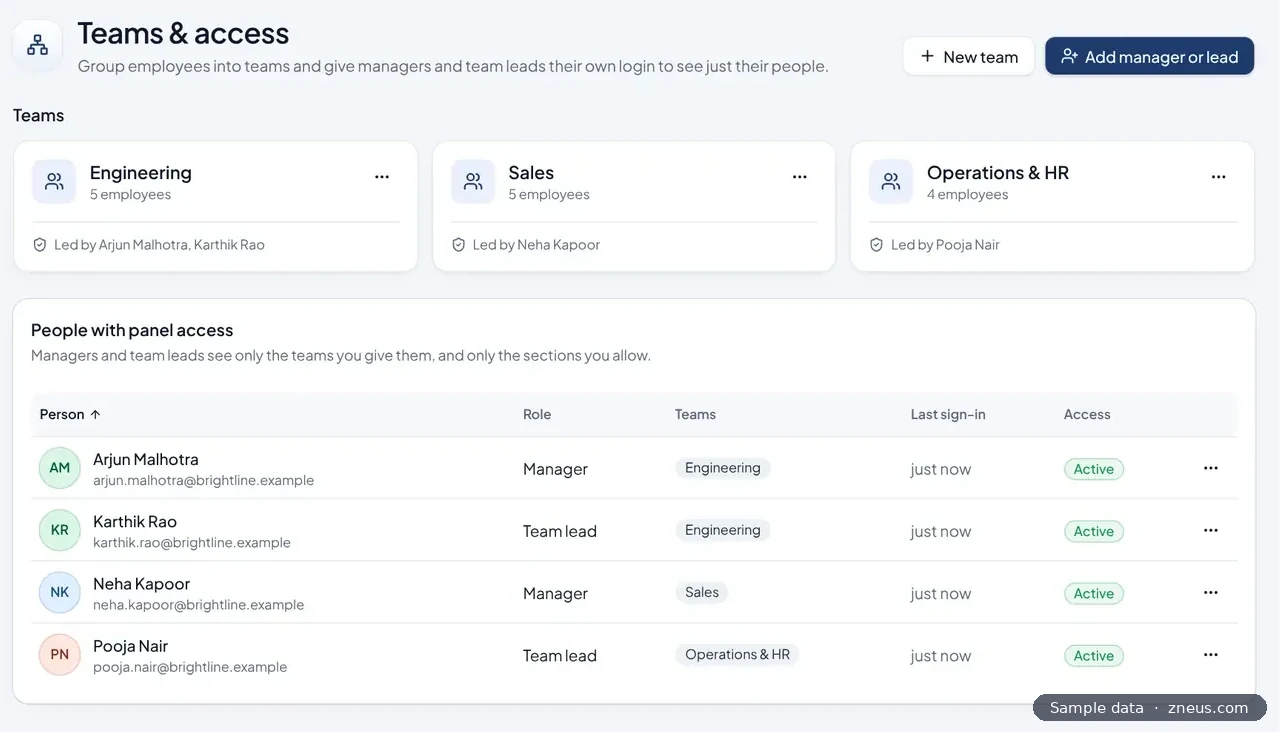
With Team Access, a manager signs in to the same panel but sees only the people in their teams, and only the sections you switch on for them.
Steps
-
Create a team
Open Teams & access and create a team, for example Support. Choose its members. A person can be in more than one team.
-
Add the manager
Under People with panel access, add a person. Fill in their full name, email, username, role and a temporary password.
-
Pick their teams
Under Teams they look after, choose the teams this person manages.
-
Pick what they can open
Under What they can open, switch on only the sections they need, such as live screens, attendance or leave.
-
Share the login
Give them the panel address, username and temporary password. They are asked to choose their own password after signing in.
Good to know
- Removing a manager deletes their panel login. Teams and employees are not affected.
- Salary figures stay hidden from managers unless you allow them.
Questions about this
Is Team Access included in every plan?
Team Access is an add-on. Ask us and we switch it on for your account.
Related
Stuck on a step?
Tell us where. We help you set Zneus up on a call, in Hindi or English.