Live Screen Monitoring vs Screenshots: What’s Better?
In today’s digital workplace, businesses need better ways to understand how employees are spending their working time, whether tasks are progressing as expected, and where productivity can be improved. As more teams work across different locations and managers handle multiple employees, traditional supervision is becoming less practical.
Two commonly used approaches for understanding employee computer activity are live screen monitoring and screenshots. Both methods can provide visibility into employee activity, but they work in very different ways.
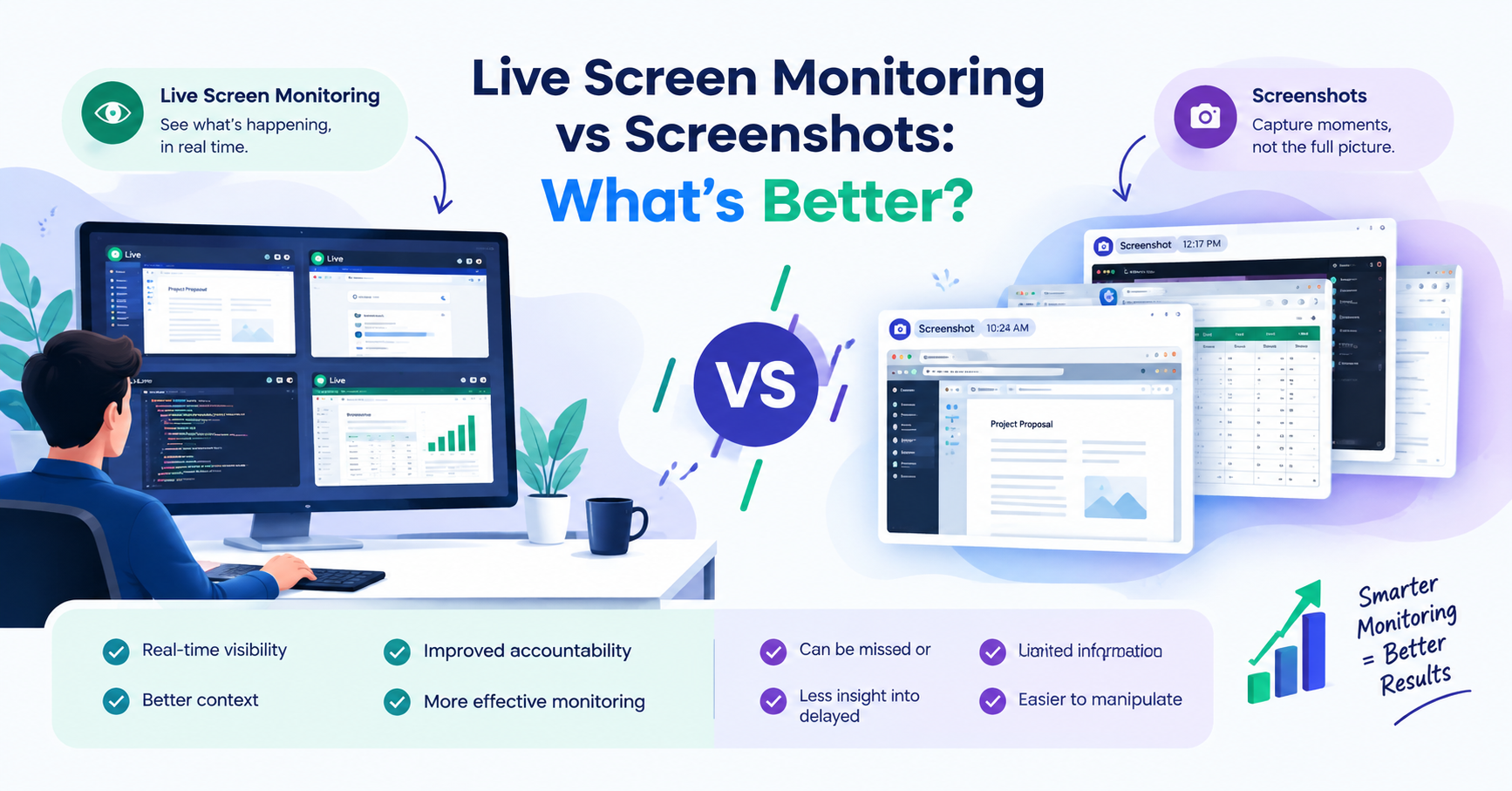
Screenshots capture a particular moment on an employee’s screen, while live screen monitoring provides a real-time view of what is happening. This difference can have a major impact on how managers understand work patterns, identify issues, and support their teams.
So, live screen monitoring vs screenshots—which one is better?
The answer depends on the organization’s requirements, privacy policies, and monitoring goals. However, when the goal is to get more context and real-time visibility, live screen monitoring can offer several advantages over relying only on periodic screenshots.
What Is Live Screen Monitoring?
Live screen monitoring allows authorized managers or administrators to view an employee’s computer screen in real time.
Instead of waiting for a screenshot to be captured, managers can see what is happening on the screen at that particular moment. This can provide a clearer picture of ongoing work and help managers understand the context behind an employee’s activity.
For example, imagine an employee is working on a project, handling customer information, preparing a report, or troubleshooting a technical issue. A screenshot may capture only one moment of that process.
Live monitoring, on the other hand, can provide a continuous view of the activity, making it easier to understand what the employee is actually working on.
Key benefits of live screen monitoring include:
- Real-time visibility
- Better understanding of ongoing tasks
- Faster identification of problems
- Improved accountability
- Better context around employee activity
- More effective supervision
- Faster support when an employee needs assistance
The important point is that live monitoring can provide context, rather than simply showing an isolated image.
What Are Screenshots?
Screenshots are captured images of an employee’s computer screen at specific intervals.
For example, monitoring software may take screenshots every few minutes or according to a configured schedule. These images can later be reviewed by managers or administrators.
Screenshots can be useful because they create a visual record of what appeared on the screen at a particular time.
However, screenshots also have a limitation: they represent moments rather than continuous activity.
Suppose a screenshot is captured at 10:00 AM. It may show an employee working on a document. But the screenshot does not necessarily tell the complete story of what happened before or after that moment.
The employee could have:
- Started working on the document earlier
- Switched between multiple applications
- Researched information
- Attended a work-related meeting
- Solved a technical issue
- Completed another important task
A single screenshot may not provide enough information to understand the entire workflow.
Live Screen Monitoring vs Screenshots
The biggest difference between the two approaches is real-time visibility versus periodic snapshots.
| Feature | Live Screen Monitoring | Screenshots |
|---|---|---|
| Visibility | Real-time | Periodic |
| Information | Continuous context | Individual moments |
| Monitoring | Immediate | Requires later review |
| Problem identification | Faster | May be delayed |
| Context | More detailed | Limited |
| Accountability | Stronger real-time visibility | Based on captured moments |
| Review | Can observe activity as it happens | Review captured images |
| Best for | Real-time supervision and support | Activity records and periodic review |
This comparison shows why organizations may prefer live monitoring when they need a more complete understanding of work activity.
1. Real-Time Visibility
One of the biggest advantages of live screen monitoring is real-time visibility.
Managers do not necessarily have to wait until screenshots are captured and reviewed. They can observe activity as it happens, where appropriate and with proper authorization.
This can be particularly useful when employees are working on important tasks that require immediate attention.
For example, if an employee encounters an application problem, a manager or authorized support person may be able to recognize the issue more quickly through live visibility.
Screenshots, however, may not capture the exact moment when the problem occurs.
2. Better Context
Context is extremely important when evaluating computer activity.
A screenshot might show that an employee has a particular application open, but it does not always explain why that application is being used.
For example, seeing a browser open does not automatically mean the employee is doing something unrelated to work. They could be:
- Researching a project
- Checking company information
- Looking for technical documentation
- Communicating with a client
- Comparing business information
- Finding information needed for a report
Without context, a screenshot can sometimes be misunderstood.
Live monitoring can provide a broader view of what is happening, allowing authorized managers to better understand the workflow instead of judging activity based on one captured moment.
3. Improved Accountability
Accountability is another important factor for organizations.
When employees know that their work activity can be reviewed according to company policy, it can encourage better work discipline and responsible use of company systems.
However, monitoring should not be about constantly watching employees or creating unnecessary pressure.
The better approach is to use monitoring as a tool for transparency, productivity analysis, support, and accountability.
Live visibility can make it easier to understand whether work is progressing and whether employees require assistance.
4. Screenshots Can Provide Useful Records
Although live monitoring has several advantages, screenshots should not be considered useless.
Screenshots can still be valuable for organizations that need periodic visual records.
For example, screenshots may help managers review:
- What application was visible at a specific time
- Whether a particular task was being worked on
- General computer activity
- Historical records
- Specific moments that need to be reviewed later
The limitation is that screenshots provide only the captured moments.
Therefore, screenshots can work well when an organization needs periodic evidence or historical snapshots, while live monitoring can be more useful when real-time visibility is important.
5. Why Screenshots May Provide Limited Information
Imagine an employee is working continuously for one hour.
If a screenshot is captured at 10:00 AM and another at 10:30 AM, the manager can see those two moments.
But what happened between 10:00 and 10:30?
That information may not be visible in the screenshots.
The employee could have completed several important activities during that period.
This is one of the main differences between screenshots and live monitoring.
Screenshots answer: “What was visible at this moment?”
Live monitoring can help answer: “What is happening right now?”
That distinction can be important for managers who need a clearer understanding of ongoing workflows.
6. Faster Identification of Problems
Another advantage of real-time visibility is the ability to identify issues sooner.
Suppose an employee is unable to access an application or is experiencing a technical problem. If the issue is visible in real time, the appropriate manager or support person may be able to respond more quickly.
With screenshots, the problem might not be noticed until someone reviews the captured image.
This delay can be significant when the employee is working on an urgent task.
For businesses where quick problem resolution is important, real-time monitoring can therefore provide an additional layer of visibility.
7. Better Understanding of Productivity
Employee productivity should not be measured simply by looking at whether a computer screen contains a particular application.
Productivity is more complicated than that.
An employee may spend time researching, planning, communicating, analyzing information, creating documents, or solving problems.
Live screen monitoring can provide additional context around these activities.
Managers can use this information alongside other productivity indicators such as:
- Task completion
- Project progress
- Time spent on assignments
- Deadlines
- Work quality
- Application usage
- Team performance
This creates a more balanced approach to productivity management.
8. Live Monitoring Is Not About Micromanagement
One common concern about screen monitoring is that it can become a tool for micromanagement.
That is why organizations should establish clear policies before implementing monitoring.
The purpose should be to improve:
Visibility → Understanding → Support → Productivity
rather than:
Monitoring → Pressure → Constant Supervision
Employees should understand what information is collected, why it is collected, who can access it, and how it will be used.
A transparent monitoring strategy can help organizations balance productivity with employee trust.
9. Privacy and Responsible Monitoring Matter
Whether an organization uses screenshots, live monitoring, or another form of employee monitoring, privacy should always be considered.
Monitoring policies should be clearly communicated to employees and should follow applicable laws, regulations, contracts, and company policies.
Organizations should also consider:
- Who can access monitoring information
- How long information is retained
- What activities are monitored
- When monitoring is active
- How monitoring data is protected
- Whether employees have been properly informed
The goal should be responsible monitoring, not unnecessary surveillance.
10. Which One Should Businesses Choose?
There is no single solution that is perfect for every organization.
The right choice depends on what the business actually wants to achieve.
Choose screenshots when:
- Periodic visual records are sufficient
- Managers need historical snapshots
- Continuous visibility is unnecessary
- The organization wants a simpler monitoring approach
- Occasional activity verification is the primary goal
Choose live screen monitoring when:
- Real-time visibility is important
- Managers need better context
- Immediate support may be required
- Teams handle important real-time workflows
- Organizations need more detailed visibility into ongoing activity
In some cases, businesses may use both methods as part of a broader employee productivity and monitoring strategy.
Live Screen Monitoring vs Screenshots: What’s Better?
When comparing the two, live screen monitoring generally provides more immediate visibility and context, while screenshots provide useful snapshots of activity at specific moments.
Screenshots are relatively straightforward to understand: they capture what was visible on the screen at a particular time.
Live monitoring goes further by allowing authorized users to observe ongoing activity in real time.
That makes it particularly useful when businesses need to understand workflows, provide timely support, identify problems, and maintain better visibility into ongoing work.
However, the best solution is not necessarily the one that monitors the most. It is the one that provides the right amount of visibility for the organization’s actual needs while respecting privacy and transparency.
Final Thoughts
The debate between live screen monitoring vs screenshots ultimately comes down to the type of visibility an organization requires.
Screenshots can be useful for capturing specific moments and maintaining periodic records. They provide a simple way to review what was visible on an employee’s screen at a particular time.
Live screen monitoring, however, can provide a more dynamic view of ongoing activity. It can help managers understand work in context, identify issues faster, improve accountability, and provide timely support when needed.
For organizations looking for real-time visibility and a deeper understanding of employee computer activity, live screen monitoring can be a more powerful option than relying exclusively on screenshots.
At the same time, monitoring should always be implemented thoughtfully. Clear policies, employee transparency, appropriate access controls, and respect for privacy are essential for creating a healthy and responsible monitoring environment.
In short: screenshots show moments, while live screen monitoring provides a broader real-time view. The better option depends on whether your organization needs periodic records or deeper, real-time visibility into ongoing work.